
Package & Delivery Tracker
MultiApp Dynamics OUTools
3.5254.00 Reviews
- Version
- 1.0.9
- Installs
- 100.00K
- Age Rating
- Everyone
Screenshots
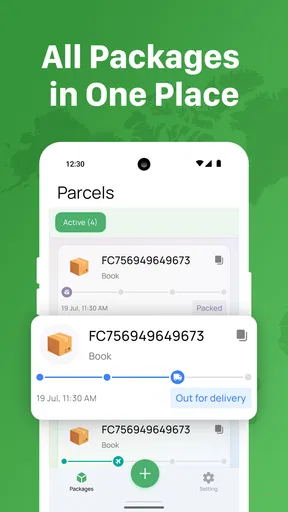
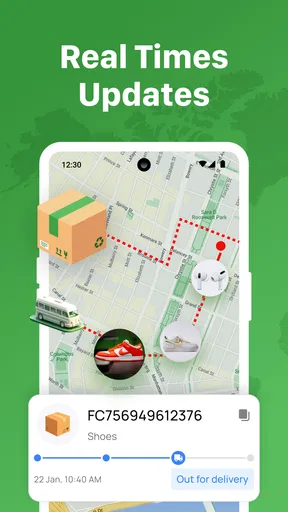
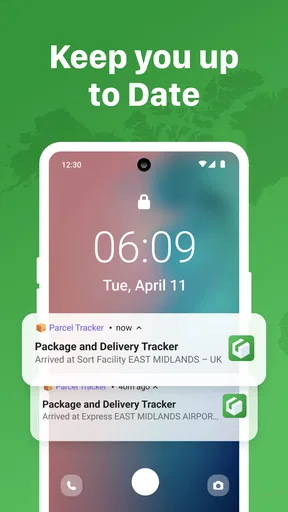
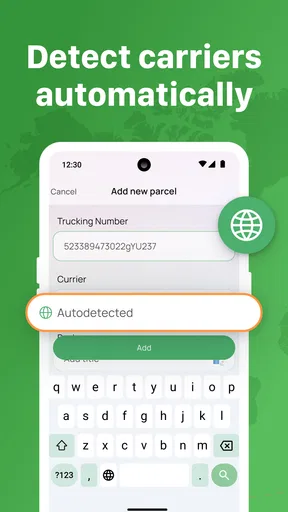
Our Review of Package & Delivery Tracker
 Analysis by Appyee
When I install a parcel-tracking tool, I want one simple result: I should be able to see what is happening with a delivery without opening several retailer accounts or searching through old emails. Package & Delivery Tracker is built around that everyday need. It is a free tools app from MultiApp Dynamics OU, aimed at people who want a single place to follow packages and make better use of delivery updates.
My first impression is that the app is best understood as a practical organizer rather than a replacement for every courier’s own system. Its store summary focuses on real-time parcel tracking and informed delivery, while its shorter description presents it as a package tracker. That distinction matters: the app is useful when you need a clearer view of shipments, but the final authority for a delivery is still normally the carrier or retailer handling the parcel.
The app is available to everyone and supports Android devices running version 7.0 or later. It is free to install, although optional purchases range from $7.99 to $49.99 per item. I would therefore approach it as a low-risk way to test a tracking workflow, while paying attention before selecting anything that costs money.
From installation to a useful delivery check
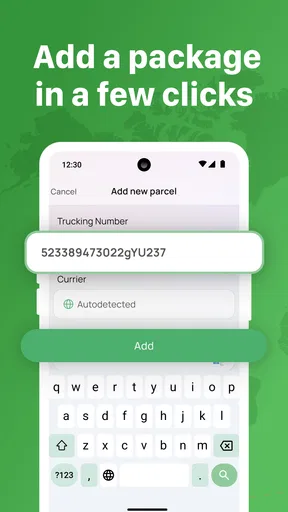
I start by adding one parcel I can already identify in a retailer’s confirmation, then use its tracking reference to see how the app presents the shipment’s progress. That small test helps me judge whether a shared view will actually save time before I bring more deliveries into the routine. Next, I look at how to interpret updates and handle the moments when a status needs a closer check.
What to expect before adding a package
Package & Delivery Tracker is not the kind of app I would install for entertainment or deep account management. Its value appears when I have several orders in motion, a delivery I cannot afford to miss, or a parcel whose status is difficult to follow from a retailer’s order page. The central benefit is reducing the mental work involved in remembering which shipment belongs to which purchase.
The app has reached more than 100,000 installs and holds an average rating of 3.5 from around 3,600 ratings. That tells me it has attracted a meaningful audience, but it also suggests that the experience may not feel equally smooth for everyone. I would not treat the rating as a guarantee of flawless tracking. Instead, I would use it as a reason to test the app with one ordinary parcel before relying on it for something urgent.
The current version is 1.0.9, and the developer is MultiApp Dynamics OU. Because this is a relatively focused utility, the most important question is not whether it has a long list of features. The better question is whether it makes the specific task of checking a shipment faster and less confusing than the method I already use.
For a first-time user, a sensible expectation is that the app will help gather delivery information into a more convenient view. It should not be treated as proof that a parcel is physically moving at every moment. Tracking updates depend on scans and status messages from delivery networks, so a quiet period may reflect the carrier’s update cycle rather than a problem with the app.
Setting it up without creating unnecessary work
I recommend starting with a package that is already on the way and whose tracking details are easy to find. This makes the first session much more useful than entering a shipment I have only just ordered. I would copy the tracking reference carefully, check it before confirming, and give the shipment a recognizable label if the app offers that kind of organization. A label such as “office chair” or “birthday gift” is more helpful than relying on a long string of characters later.
The best first setup is deliberately small. Adding every old order at once can make it hard to tell whether a problem comes from the app, an outdated shipment, or a mistyped reference. One active delivery gives me a clean test: I can see whether the parcel appears, whether its status is understandable, and whether returning to the app later saves time.
I would also keep the original retailer confirmation nearby during setup. If the app displays a status that seems vague, the retailer’s order page can provide context about the item and the expected delivery window. This is one of the most useful habits with any multi-carrier tracker: use the tracker for a quick overview, but keep the original order information until the package arrives.
There is a practical trade-off here. A single tracking app can reduce switching between courier pages, but it may not present every carrier’s information in exactly the same way. One service might show a detailed scan history, while another may offer only broad stages such as in transit or delivered. I would judge the app by whether it makes my own set of deliveries easier to manage, not by expecting identical detail from every shipment.
The first successful action: confirm one real shipment
The first meaningful success is not simply opening the app. It is adding one live parcel and returning later to understand its latest status without repeating the entire search process. That is the moment when I can decide whether Package & Delivery Tracker deserves a permanent place on my phone.
After entering a tracking reference, I would read the status as a current indication rather than a promise. If the parcel is marked as moving, I would look for the latest update time or event shown in the app. If it appears delivered, I would compare that with the location where the retailer or carrier says it was left. If the status has not changed, I would wait for a sensible interval before assuming something is wrong.
A realistic example is a weekday delivery to a shared apartment building. I might be away from home and receive a notification that the package is close, but not know whether I should ask a neighbor to check the entrance. A tracker gives me a place to review the shipment quickly. If the information still says the parcel is in transit, I avoid making an unnecessary trip home. If it changes to delivered, I can check the building’s usual drop-off area or contact the retailer with a more precise status.
Another useful situation is preparing for travel. If I have ordered a replacement charger or travel accessory, I can add that shipment early and check it alongside other deliveries. The advantage is not dramatic automation; it is reducing the chance that an important parcel disappears into a crowded inbox.
My advice is to perform this first check manually and learn how the app presents updates. Once I understand its wording, later checks become faster. I would not immediately assume that a notification, if available, means I can stop checking the carrier’s own message for exceptions such as address problems, customs requests, or a failed delivery attempt.
Where first-time users may become confused
Parcel language is often less clear than people expect. “In transit” can mean a shipment is traveling between facilities, waiting for the next scan, or simply has not reached its final delivery stage. “Out for delivery” usually sounds more definite, but even that status does not guarantee a particular arrival time. The app can make the information easier to find, yet it cannot make carrier terminology more precise than the source update itself.
A second point of confusion is the difference between a tracking reference and an order number. Retailers often display both, and they are not always interchangeable. If a shipment does not appear after I enter a number, I would first compare the characters with the carrier email and try the actual tracking reference rather than the retailer’s internal order code.
It is also easy to mistake an old status for a frozen parcel. A package may remain unchanged during a weekend, overnight period, or transfer between networks. My approach is to note the last event, then check whether the carrier’s own page gives more detail before contacting support. This avoids treating normal gaps in scanning as evidence that the app has lost the shipment.
There is another important limitation for people who expect a universal delivery dashboard. A tracking app can organize information, but it does not control the courier’s route, correct a wrong address, or force a carrier to scan a parcel. If a package is late, damaged, or marked delivered incorrectly, I would use the app’s status as a starting point and then contact the retailer or delivery company responsible for resolving the issue.
I would also be careful with optional purchases. The app is free, but individual in-app items cost between $7.99 and $49.99. Before paying, I would make sure I understand what the purchase changes and whether the free experience already covers my normal tracking needs. Someone who follows only a few parcels may find the free installation sufficient, while a heavier user should compare the value of any paid option with simply using retailer and carrier tools directly.
How it compares with the usual alternatives
The most common alternative is checking each retailer’s order page. That method usually gives strong product context, such as what was purchased and which delivery estimate was shown at checkout. Its weakness is fragmentation. If I buy from several stores, I have to remember different logins, search different emails, and interpret different status layouts.
Going directly to a courier’s website or app can provide the most authoritative shipment detail. It may also be the better choice when I need to change delivery instructions, report a problem, or request help with a missed delivery. Package & Delivery Tracker is more attractive when my priority is a quick overview rather than carrier-specific control.
Email notifications are another surprisingly capable alternative. They require no extra tracking app and often contain the original order information. However, inbox searches become awkward when several parcels have similar subjects or when updates are spread across multiple retailers. A dedicated tracker can be more convenient for repeated checking, especially when I want to see delivery activity without opening old messages.
For someone who receives many shipments, the key trade-off is convenience versus depth. This app’s appeal is the central view and the reduced need to jump between services. The courier’s own tool remains preferable for exceptions, detailed scan history, delivery changes, and formal support. I would use Package & Delivery Tracker as the first screen I check, not as the only source I trust.
Small workflows that make the app more useful
One helpful workflow is separating urgent parcels from ordinary purchases by the way I name or review them. A medical supply, work item, or gift can receive a clear descriptive label, while routine orders can remain less prominent. This makes a quick morning check more informative than scrolling through anonymous tracking references.
A second workflow is checking the app at decision points rather than constantly refreshing it. I might review a shipment before leaving home, after receiving a delivery message, and when I return in the evening. Constant checking does not create new carrier scans, so scheduled habits are less stressful and usually just as useful.
A third insight is to keep evidence outside the tracker when a delivery matters. For an expensive or time-sensitive order, I would retain the retailer confirmation and any carrier message until the parcel is safely received. The tracker helps me notice changes, but the original records are more useful if I need to explain a missing or misdelivered package.
I would also remove or stop checking shipments that are no longer relevant, if the app’s organization allows it. A crowded list can hide the one parcel I actually care about. Even without advanced sorting, a small amount of housekeeping keeps the tracker from becoming another inbox full of stale information.
Who should use it, and who should skip it
I think Package & Delivery Tracker is a good fit for people who order from several places, dislike searching through email, or want a straightforward way to review active deliveries. It is also useful for households where one person wants to keep an eye on a package ordered by another, provided the necessary tracking details are available.
I would be more cautious if I rarely receive parcels or already prefer each courier’s official app. In that case, adding another tool may not remove enough effort to justify changing habits. The same applies to users who need delivery modifications, claims, address corrections, or detailed carrier support. Those tasks belong with the retailer or courier, not with a general tracking layer.
Privacy-conscious users should make their own comfort decision before entering shipment references. A tracking number can reveal information about a delivery, so I would avoid sharing it casually and would not add someone else’s parcel unless I had permission. The app’s usefulness depends on having shipment details, which means sensible handling of those details remains part of the user’s responsibility.
My next step after the first delivery
After one successful shipment, I would add a second parcel from a different retailer or delivery network. That is a better test than adding many similar orders, because it shows whether the app genuinely simplifies a mixed delivery routine. I would compare how quickly I can identify each package and whether the statuses remain understandable when the shipments move at different speeds.
If the app makes those checks easier, I would keep it as a central dashboard and continue using official carrier pages only when something needs attention. If it does not save time, I would remove it rather than paying for features I do not need. The free starting point makes that experiment reasonable, but the optional purchases mean I would not upgrade until the app has proven useful in my own routine.
Overall, I see Package & Delivery Tracker as a practical middle ground between scattered retailer emails and more detailed courier-specific tools. Its strongest role is helping me answer a simple question quickly: where is my package now, and do I need to do anything? It is not a delivery guarantee or a replacement for customer support, but for everyday parcel organization, that focused purpose can be genuinely helpful.
My recommendation: try it with one active shipment, learn how its status updates read, and then decide whether the central view improves your routine. For a first-time user, that small test is enough to reach a meaningful result without creating unnecessary setup work or committing to an in-app purchase.
Verdict
Strengths of Package & Delivery Tracker
- Tracks parcels from multiple carriers in one place.
- Supports shipment updates for international deliveries.
- Provides clear status changes throughout the delivery process.
- Helps users monitor several active packages at once.
- Useful for spotting delays before contacting the carrier.
Limitations of Package & Delivery Tracker
- Tracking accuracy depends on carrier data and update frequency.
- Some couriers may offer limited tracking information.
- Delivery estimates can change without warning.
- Notifications may arrive late during carrier system delays.
- Advanced features may require payment or contain advertisements.
Similar Picks in This Category
View All
Google LLC4.0

Gboard - the Google Keyboard
Google LLC4.5

Google Play services
Google LLC4.3

Google Play Store
Google LLC4.9

Files by Google
Google LLC4.5

SHAREit: Transfer, Share Files
Smart Media4U Technology Pte.Ltd.4.3
Frequently Asked Questions
What is Package & Delivery Tracker used for?
Package & Delivery Tracker is designed to help you monitor shipments from one place instead of checking several courier websites individually. You can usually add a tracking number, select or allow the app to identify the carrier, and view updates such as acceptance, transit, customs processing, delivery attempts, and final delivery. It is especially useful for users who regularly order products online or send parcels.
Which delivery companies and tracking numbers are supported?
Support can vary depending on the app version, region, and the courier databases connected to the service. Package & Delivery Tracker may recognize tracking numbers from major national and international carriers, but smaller local couriers are not always available. If automatic carrier detection fails, try selecting the shipping company manually or checking whether the courier provides a compatible tracking format.
Does Package & Delivery Tracker provide real-time delivery updates?
The app displays tracking information supplied by shipping carriers, so update speed depends mainly on the courier rather than the application itself. Some events may appear shortly after they occur, while others can be delayed for several hours, particularly during weekends, holidays, customs inspections, or periods of heavy shipping activity. The app should be treated as a convenient tracking interface, not a guaranteed live GPS service.
Can I receive notifications when my package status changes?
Package & Delivery Tracker may allow notifications for important shipment events, such as dispatch, arrival at a facility, customs clearance, delivery attempts, or successful delivery. Notification availability can depend on your device permissions, the selected tracking service, and the app’s current settings. After adding a parcel, review notification preferences and ensure background activity is not being restricted by your phone’s battery-saving options.
Is Package & Delivery Tracker free, and are there privacy concerns?
The basic tracking function may be available without payment, although some versions can include advertising, premium features, or subscription options. Before confirming any purchase, review the pricing and renewal terms shown in the app store. You should also avoid entering unnecessary personal information. A tracking number alone is generally sufficient, but shipment details can sometimes reveal order or delivery information, so use the app responsibly.
